

Simulate Chat with Bot
Simulate Bot allows human agents to test and improve AI agent responses using real customer conversations. Instead of guessing how the bot might behave, agents can validate bot answers directly from an actual chat scenario before continuing the conversation with the customer.
This feature is especially useful when the AI agent gives an incorrect, incomplete, or inappropriate response. Agents can update the bot's knowledge base or configuration, then immediately re-test the bot using the same conversation context. Simulate Bot can also be used to compare multiple bots by running them against the same conversation flow, helping ensure the selected bot provides the most accurate and relevant response.
The main purpose of this feature is to help you continuously improve your bot's answers by testing them against real cases from real conversations.
To start, open a conversation from the inbox, then click the bot icon in the top-right header of the conversation.
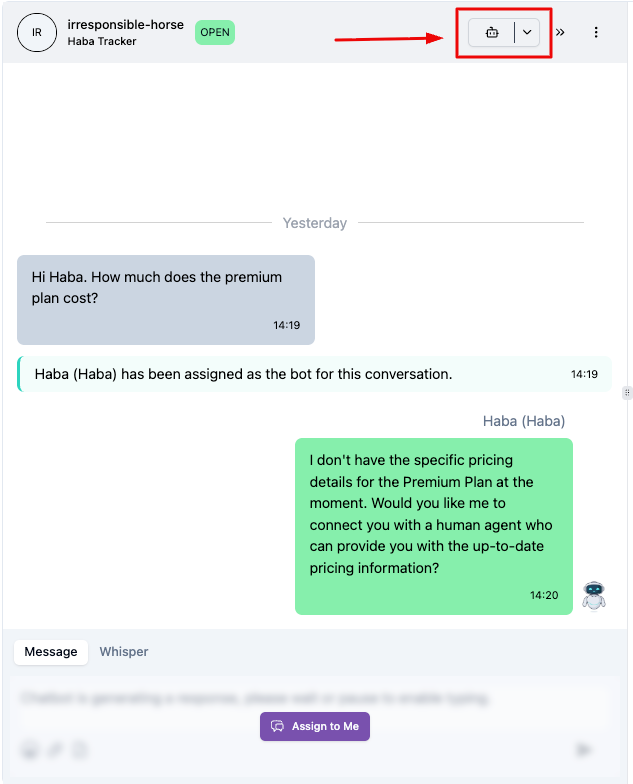
How to simulate chat with bot
-
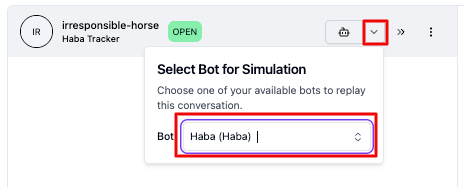
Click the down arrow to select which bot you want to simulate the conversation with.
-
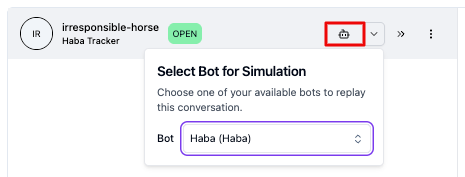
After selecting the bot, click the bot icon next to the arrow to open the sandbox environment for the selected bot.
-
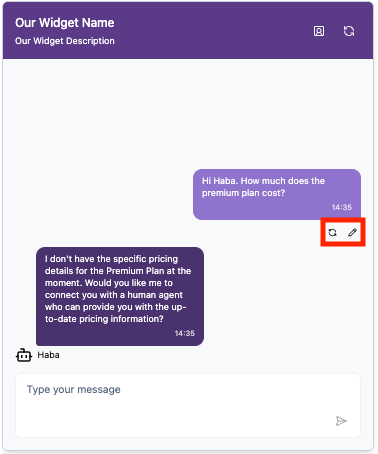
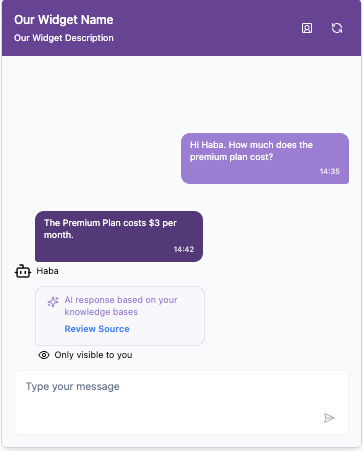
In the sandbox, you can re-test the bot's response using the same message from the conversation or edit the message to explore different variations. This allows you to see how the bot responds in different scenarios.
-
The bot will then re-generate a new response. For example, the bot was previously unable to answer a pricing-related question due to missing knowledge, you can update the Knowledge Base and test again using the same conversation. Once updated, the bot should be able to provide the correct pricing information.
By using Simulate Bot, you can safely test improvements, validate changes, and ensure your AI agent delivers accurate and helpful responses—before handing the conversation back to the customer.
