

Set Up Your Askyura Account
This guide walks you through the steps to create and activate your Askyura account so you can get started quickly.
Step 1: Go to the Registration Page
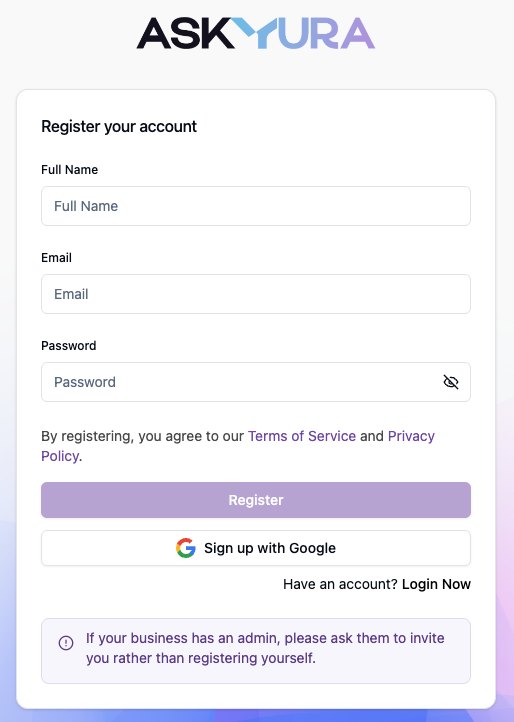
Open the Askyura registration page at https://dashboard.askyura.com/app/register. You'll be taken directly to the sign-up form to create your account.
Step 2: Register Your Account
Enter your full name, email address, and password.
Alternatively, click Sign Up with Google to register instantly using your Google account.
If you choose this option, your account will be verified automatically, and no email verification is required.
Step 3: Verify Your Email Address (Email Sign-Up Only)
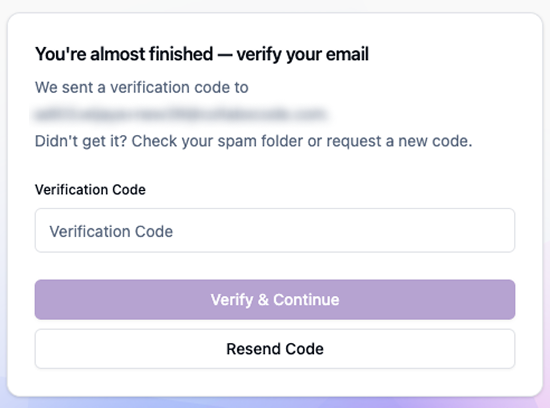
If you sign up using email and password, you'll need to activate your account. The system will prompt you to enter a verification code, as shown below.
Step 4: Check Your Email
Look for an email with the subject "Askyura – Activate Your Account" sent to your registered email address.

If you don't see the email, check your junk/spam folder.
Step 5: Complete Verification
Input the code that you get from email to the "Verification Code" field.
🎉 Congratulations! Your Askyura account is now verified and ready to use.
