

Overview

The Knowledge Base is the central place where you store articles and data that the chatbot uses as a reference when answering customer questions. It acts as the bot's single source of truth, ensuring responses are accurate, consistent, and aligned with your business knowledge.
Looking to configure Knowledge Base settings for a specific bot? See Bot Knowledge Base Configuration.
To access the Knowledge Base, navigate to Bot → Knowledge Base in your dashboard.
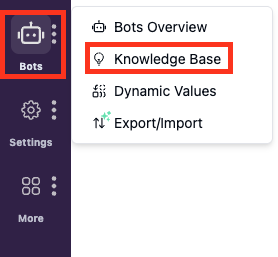
From this page, you can create, manage, and search articles that will be used by the chatbot. The Knowledge Base also includes an AI-driven search engine that allows you to quickly locate and retrieve stored articles using natural language, making content management easier as your Knowledge Base grows.
Key Features
Articles
Articles are where you store structured knowledge such as FAQs, product documentation, policies, and troubleshooting guides.
Each article should focus on a clear topic and be written in a way that is easy for both humans and the bot to understand. Well-written articles help the chatbot provide more precise and relevant answers to customer questions.
To learn more about creating, managing, and organizing articles, you can continue to the Articles guide.
AI Search
AI Search helps you find relevant articles inside the Knowledge Base using natural language queries.
Instead of relying on exact keywords, AI Search understands intent and context, making it easier to locate information, especially when your Knowledge Base contains a large number of articles.
For a deeper explanation of how AI Search works and how to use it effectively, you can refer to the AI Search guide.
How the Knowledge Base Supports the Chatbot
When a customer asks a question, the chatbot searches the Knowledge Base to find the most relevant article and uses that content to generate its response.
If no relevant information is found, the chatbot may provide a generic response or trigger a fallback action, such as handing the conversation over to a human agent.
