

Agents
Agents are the users who are registered to your workspace and are responsible for tasks assigned to them, such as handling conversations, responding to customers, managing the AI agent, and more. Every agent's access and permissions are controlled by their roles, which determine what actions they can perform and what information they can access within the workspace. Learn more about roles →
To access the Agents page, navigate to Settings → Agents in your dashboard.
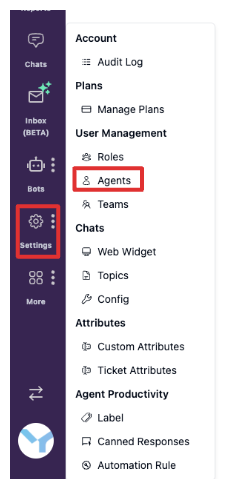
From this page, you can view all registered agents and perform key actions to manage your team. The main actions available in the Agents page are:
- Invite Agent – Add new users to your workspace and assign them roles.
- Re-Send Activation Link – Send the account activation email again to agents who haven't completed registration.
- Remove Agent from Workspace – Revoke an agent's access and remove them from the workspace.
Invite agent
Use this action to add new agents to your workspace. Inviting agents allows them to start interacting according to their assigned roles, such as handling conversations, managing tickets, or working with AI agents. Learn how to invite agents →
Re-Send Activation Link
If an agent has not activated their account, you can re-send the activation link to prompt them to complete registration.
To do this:
- Find the agent's name in the agent list.
- Click the kebab menu (⋮) on their row.
- Select Re-Send Activation Link.

This ensures the agent can access the workspace and start performing their tasks.
Remove Agent from Workspace
You can remove an agent from your workspace if they are no longer part of your support team or no longer need access to the workspace. This helps keep your workspace secure and ensures that only active team members can interact with conversations and data.
To remove an agent from the workspace:
- Find the agent's name in the agent list.
- Click the kebab menu (⋮) on their row.
- Select Remove Agent.
What happens after an agent is removed
After an agent is removed from the workspace:
- The agent can no longer access your workspace.
- Conversations that were previously handled by the removed agent will display a caution badge, indicating that the conversation is no longer reachable by the assigned agent.
A removed agent can be re-invited to your workspace at any time. When re-inviting them, you need to assign roles again, as their previous roles and permissions are not retained.
