

Chat Configuration
Chat Configuration lets you control how conversations behave in the system, helping your team manage chats more efficiently and stay aligned with their support workflow. These settings define when chats are resolved or finalized and how read statuses are handled between agents.
To access Chat Configuration, navigate to Settings → Config from the navigation bar.
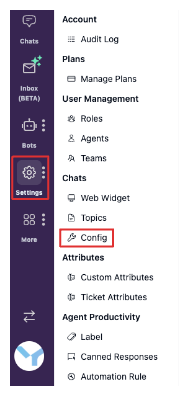
On this page, you can review and customize several chat-related settings. The sections below explain each configuration option in detail and how it affects your team's day-to-day chat handling.
Chat Resolution Timing
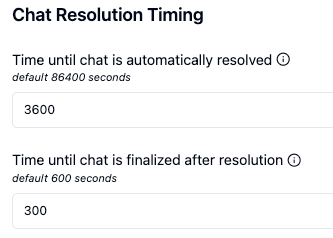
Chat Resolution Timing controls how the system automatically updates a conversation's status when there is no activity. This helps reduce manual work for agents and keeps conversations organized.
Inside this section, you will see two configurable fields:
Time until chat is automatically resolved
This setting defines how long a conversation can remain inactive before it is automatically marked as Resolved. Once a chat is resolved, it indicates that the issue has been addressed and no immediate action is required.
By default, this value is set to 86,400 seconds (24 hours). You can adjust this duration based on how long your team typically waits for customer replies before considering a conversation complete.
Time until chat is finalized after resolution
This setting determines how long a resolved conversation remains inactive before it is automatically Finalized. Finalized conversations are fully closed, meaning no further messages can be sent and the conversation cannot be reopened.
The default value is 600 seconds (10 minutes). This is useful for allowing a short grace period after resolution in case the customer responds again.
Chat Read Status Settings
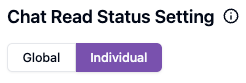
Chat Read Status Settings control how unread indicators behave when multiple agents have access to the same conversation.
You can choose one of the following options:
-
Global Read
When one agent reads a conversation, the unread counter for that conversation is cleared for all agents in the workspace. This option is suitable for collaborative teams that share responsibility across conversations.
-
Individual Read
Each agent's unread counter is cleared only when they personally open the conversation. This option works best when agents manage conversations independently and need clear visibility into what they have reviewed.
Choose the setting that best matches how your team collaborates and monitors incoming chats.
