

Conversation List
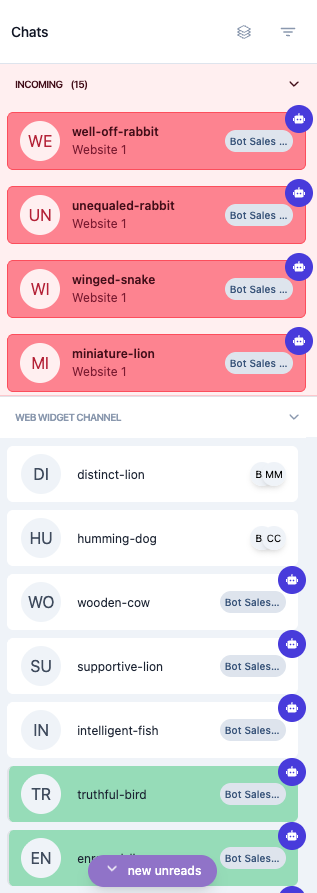
The chat menu serves as the central hub for managing all customer conversations. It organizes conversations into two main sections: Incoming Chats and Ongoing Conversations. This separation helps agents efficiently manage and track conversations based on their status and assignment, ensuring no conversation is overlooked.
Below is the explanation of each list:
Incoming List
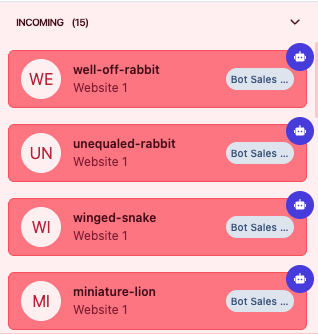
All initial chats are displayed in the Incoming Chat panel. The system automatically processes each chat and routes it to the relevant agent, either AI or human. based on the label assigned in the web widget. Once an agent joins the conversation, the chat will move to the Web Widget Channel panel.
Incoming chats are highlighted in pink to help you quickly identify chats that need attention. Chats appear in pink under the following conditions:
- A new conversation is initiated from the web widget on your website, and no agent (AI or human) has yet taken over. These chats are ready for handling.
- A previously resolved conversation receives a new message from the customer. The chat will move back into the Incoming Chat list to continue the interaction.
- The AI agent is unable to handle the customer's inquiry and requires manual intervention from an human agent. You can check the details of notifying human agents in this document.
- A conversation has an assignee transfer request pending.
- An AI agent encounters an error that prevents messages from being sent. A human agent must review and modify the AI agent's response before sending it to the customer.
- AI agent leaves the conversation because it has been deleted from the master, and no human agent is handling the conversation.
Ongoing List
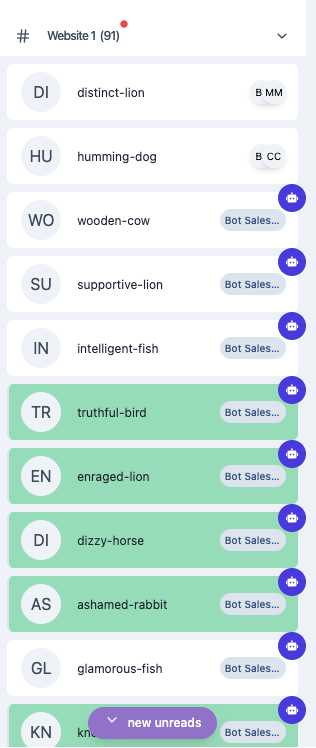
Conversations appear in the Ongoing Chat section when:
- A conversation is assigned to a human agent.
- A conversation is assigned to an AI agent (displayed with a bot icon).
- A conversation with an assignee transfer request is declined (if it had an assignee before).
- A conversation with an assignee transfer request is accepted.
- A conversation with an assignee transfer request is canceled (if it had an assignee before).
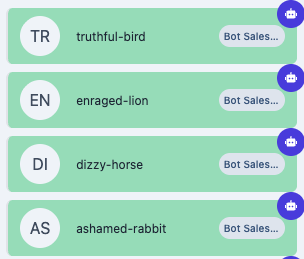
While a conversation is in the Ongoing Chat section, a highlight indicates new activity:
Green Highlight
Indicates a new message from:
- A human agent
- A customer
- An AI agent
The Conversation List provides a clear overview of all customer interactions, helping agents quickly identify which chats require attention and which are actively being handled. By separating chats into Incoming and Ongoing sections and using highlights to indicate activity, agents can manage conversations efficiently and ensure timely responses.
With this organized view, every conversation is easy to track, making it simple to stay on top of customer communication and deliver consistent support.
