

Overview
The Chat feature is designed to help you interact with customers quickly, efficiently, and in an organized way. Through this menu, you can view incoming and ongoing conversations, respond manually or collaborate with AI and human agents, monitor conversation status and progress, assign chats, organize conversations using labels, topics, and attributes, and resolve or close conversations once issues are handled.

Conversation List
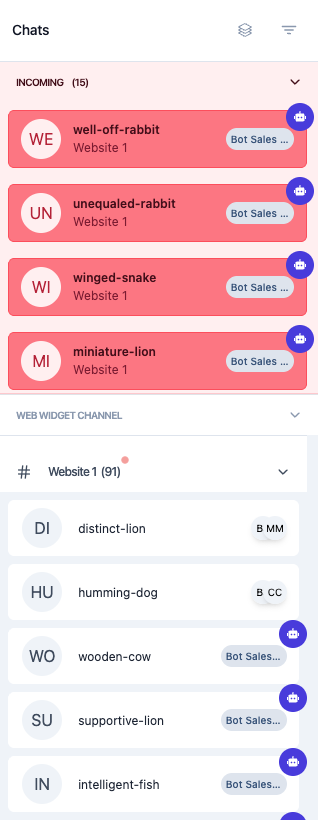
The Chat menu acts as the main hub for managing customer conversations. All chats are grouped into two categories, namely incoming chats and ongoing conversations. This separation helps you easily organize, monitor, and prioritize conversations based on their current status and assignment.
For more details, please refer to the Conversation List Page.
Conversation Area

The conversation area displays the full message exchange between you and the customer. It functions as the main workspace where interactions take place, showing all messages sent by customers, AI agents, and human agents so you can follow the conversation clearly and respond effectively.
Further details can be found on the Conversation Area Page.
Contact & Conversation Information
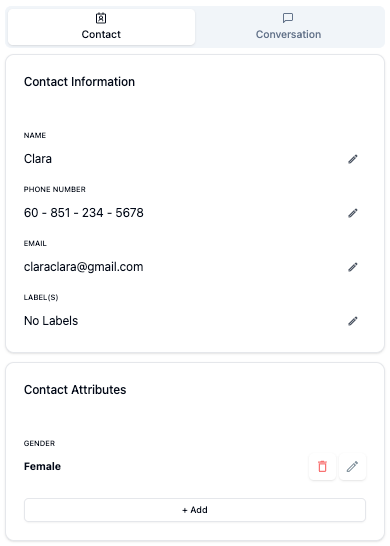
This section presents detailed information about the customer and the current conversation. It provides essential context to help you understand who you are interacting with and the state of the conversation. The information is organized into two main parts—Contact and Conversation—which are explained further in the following sections.
Additional information regarding this feature is available on the Contact & Conversation Information Page.
