

Canned Responses
Canned Responses are predefined messages that help agents respond faster and more consistently to recurring customer questions. They are especially useful for handling frequently asked questions, sharing standard information such as policies or operating hours, and guiding customers through common processes without having to type the same message repeatedly.
By using canned responses, agents can save time, reduce manual effort, and maintain a consistent tone across customer conversations.
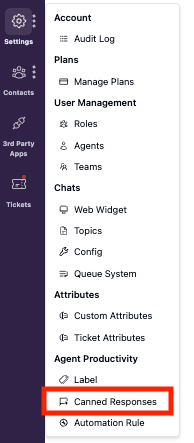
To access Canned Responses, go to Settings → Canned Response from the navigation bar.
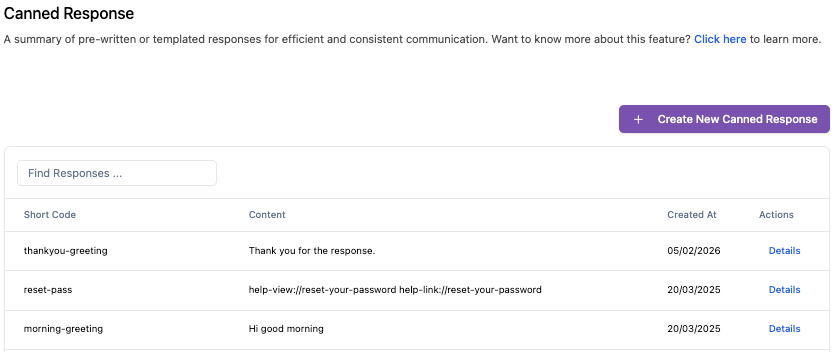
On this page, you will see a list of all canned responses that have been created previously. From here, agents can review, manage, or create new canned responses as needed.
Create Canned Response
-
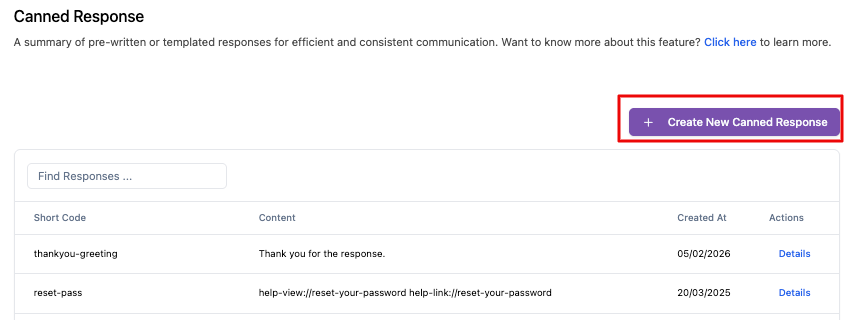
To create a new canned response, click + Create New Canned Response.
-
Fill in the required fields. Once completed, click Create response to save it.

System will automatically replace spaces with dashes.
How to Use Canned Response in Chat
Canned responses can be quickly inserted into a conversation while chatting with a customer.
- Type "/" followed by the short code you created earlier. A list of matching canned responses will appear.
- As you continue typing, the relevant canned response will be highlighted in the list. When the desired response is highlighted, press Enter to insert it into the chat input.
- After reviewing or editing the message if needed, press Enter again to send it to the customer.
Use Cases for Canned Responses
Canned responses are flexible and can be used in many support scenarios, including:
Responding to Frequently Asked Questions (FAQs)
Quickly answer common customer questions about products, services, pricing, or policies without repeating the same explanations.
Providing Standard Information
Share consistent information such as office hours, return policies, shipping details, or contact instructions with minimal effort.
Guiding Customers Through Processes
Help customers complete common tasks by sending step-by-step instructions or links to relevant resources, enabling them to resolve issues more efficiently.
